Browser
Browser is a web interface that allows you to inspect existing streams and their contents. You can use it for debugging purpose as well as a built-in audit log frontend.
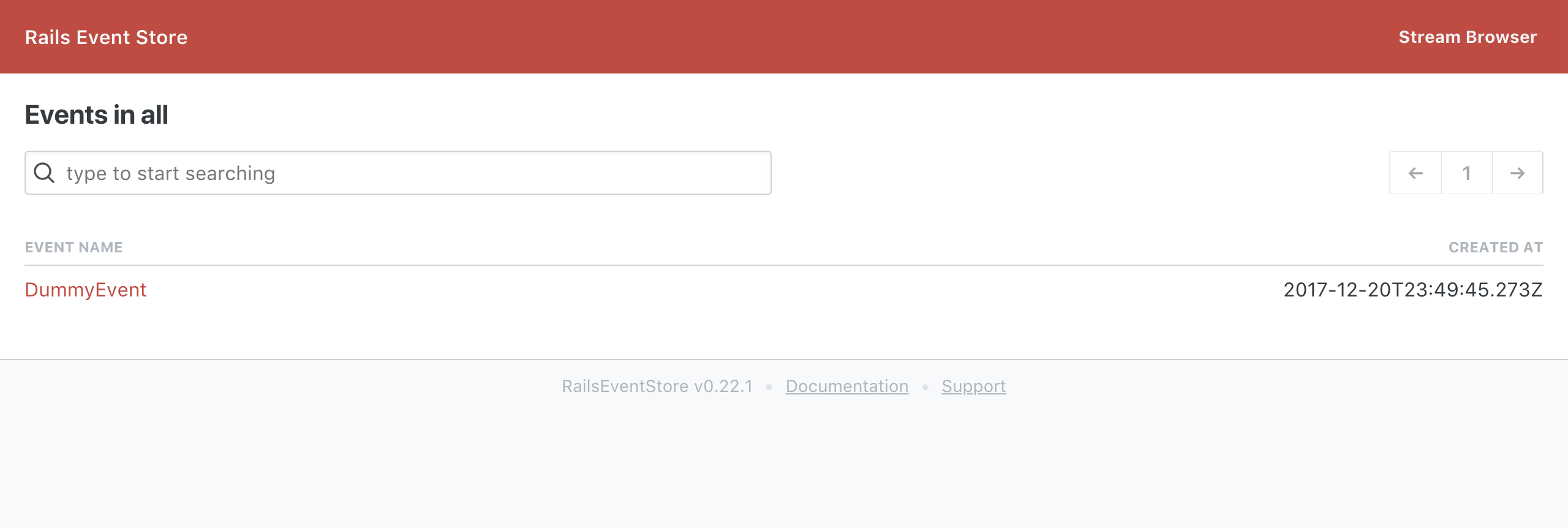
Adding browser to the project
Rails
Browser is now an integral part of RailsEventStore bundle and comes as a dependency when you install rails_event_store gem. To enable it in your Rails project, add following line to routes.rb:
Rails.application.routes.draw { mount RailsEventStore::Browser => "/res" if Rails.env.development? }
It is assumed that you have Rails Event Store configured at Rails.configuration.event_store, in recommended location.
The RailsEventStore::Browser is just a wrapper around RubyEventStore::Browser::App with default options suitable for most applications. Read below the Rack, in case you need this browser outside as a standalone application or you have a different event store location.
Rack
Add this line to your application's Gemfile:
gem "ruby_event_store-browser"
Add this to your config.ru or wherever you mount your Rack apps to enable web interface. Check the appropriate environment variable (e.g. ENV['RACK_ENV']) to only mount the browser in the appropriate environment such as development.
There is a helper method on the Rack app taking event_store_locator, related_streams_query, extensions and views_root options. Host and mount point are recognized from the Rack environment — the legacy host: and path: options are deprecated and warn when used.
# e.g. config.ru

require "ruby_event_store/browser/app"

# Example RES client you might configure
event_store = RubyEventStore::Client.new(repository: RubyEventStore::InMemoryRepository.new)

run RubyEventStore::Browser::App.for(event_store_locator: -> { event_store })
Usage in production
Rails
In a production environment you'll likely want to protect access to the browser. You can use the constraints feature of routing (in the config/routes.rb file) to accomplish this:
Devise
Allow any authenticated User:
Rails.application.routes.draw do
  authenticate :user do
    mount RailsEventStore::Browser => "/res"
  end
end
Allow any authenticated User for whom User#admin? returns true:
Rails.application.routes.draw do
  authenticate :user, lambda { |u| u.admin? } do
    mount RailsEventStore::Browser => "/res"
  end
end
HTTP Basic Auth
Use HTTP Basic Auth with credentials set from RES_BROWSER_USERNAME and RES_BROWSER_PASSWORD environment variables:
Rails.application.routes.draw do
  browser =
    Rack::Builder.new do
      use Rack::Auth::Basic do |username, password|
        # Protect against timing attacks:
        # - See https://codahale.com/a-lesson-in-timing-attacks/
        # - See https://thisdata.com/blog/timing-attacks-against-string-comparison/
        # - Use & (do not use &&) so that it doesn't short circuit.
        # - Use digests to stop length information leaking (see also ActiveSupport::SecurityUtils.variable_size_secure_compare)
        ActiveSupport::SecurityUtils.secure_compare(
          ::Digest::SHA256.hexdigest(username),
          ::Digest::SHA256.hexdigest(ENV["RES_BROWSER_USERNAME"]),
        ) &
          ActiveSupport::SecurityUtils.secure_compare(
            ::Digest::SHA256.hexdigest(password),
            ::Digest::SHA256.hexdigest(ENV["RES_BROWSER_PASSWORD"]),
          )
      end

      map "/" do
        run RailsEventStore::Browser
      end
    end

  mount browser => "/res"
end
Related Streams
Often you have streams, which are closely related to each other. To ease debugging, you may want to create custom links between streams. For example, if you are viewing stream Ordering::Order$123, you may want to link to stream Payments::Transaction$456.
You can do that by passing related streams query object to browser configuration. Related streams query object can be anything, which reponds to call(stream_name) and always return an array (i.e. it can be simple lambda).
Related streams will be displayed in stream view, at the bottom. For a deeper integration than links between streams, see Browser extensions below.
Example usage:
class RelatedStreamsQuery
  def call(stream_name)
    prefix, suffix = stream_name.split("$")
    if prefix == "Ordering::Order"
      transaction_id = transaction_id_for(suffix) # some way to fetch transaction id for that order
      return ["Payments::Transaction$#{transaction_id}"]
    end
    []
  end
end

RubyEventStore::Browser::App.for(related_streams_query: RelatedStreamsQuery.new)
Customizing views
This is an experimental feature — its API may change between minor releases.
Every page of the browser is rendered from an ERB template. You can replace any of them with your own — the browser resolves each template separately, so you copy and edit only the views you want to change and everything else keeps falling back to the templates built into the gem. Templates are read on every render, so changes take effect without restarting the server.
Rails
Copy the views into your application:
bin/rails generate rails_event_store:browser_views
The views land in app/views/ruby_event_store_browser/ and the mounted RailsEventStore::Browser engine picks that directory up automatically — no configuration needed. Delete the files you do not customize, so that they keep tracking the gem on upgrades.
Rack
When mounting the Rack app yourself, point the browser at your views directory explicitly:
run RubyEventStore::Browser::App.for(
  event_store_locator: -> { event_store },
  views_root: File.expand_path("res_views", __dir__),
)
This is the same option the Rails engine sets by convention.
A copied template freezes its locals — a gem upgrade may change them, which is another reason to keep only the overrides you need.
Escaping
Every <%= %> tag escapes its value, so stream names, event types and event data never turn into markup — there is no need to call h. Output of render is already HTML and is inserted as is. To insert HTML that you produced yourself and trust, wrap it in raw:
<%= raw(markdown_to_html(description)) %>
h still works and never escapes twice. A template that relied on <%= %> to insert HTML now shows it as text — wrap such values in raw.
Browser extensions
This is an experimental feature — its API may change between minor releases.
An extension is an object passed to the browser, plugging new pages and links into the UI — for example ruby_event_store-process_manager renders process manager state next to its streams. There is no base class: every hook is optional and discovered with respond_to?.
run RubyEventStore::Browser::App.for(
  event_store_locator: -> { event_store },
  extensions: [DeploymentsExtension.new],
)
Hooks
register_routes(router, context)— add own routes withrouter.add_route(request_method, pattern) { |params, urls| response }. A handler returns a rack triple or uses the context helpers.stream_links(stream_name, urls)— links displayed under the header of a stream page.event_links(event, urls)— links displayed on an event page; the hook receives the full event, so it can decide by type, data or metadata.nav_links(urls)— links in the top navigation, visible on every page.views_root— directory with the extension templates.assets_root— directory with the extension assets. Every file in it is served by the browser, and every.cssand.jsfile is automatically linked in the layout on every page.
The context
register_routes receives a context object with everything a route handler needs:
context.render(template, urls:, title: nil, **locals)— render the extension template wrapped in the browser layout, with an optional page title. Templates resolve against the extensionviews_rootfirst and fall back to the built-in views, so core partials like_timestampcan be reused.context.not_found(urls, message: "Page not found")— the styled 404 page. An extension template namednot_found.html.erboverrides its content.context.event_store— the event store client.
Building URLs
Never hardcode paths — the browser can be mounted anywhere. urls.app_url_for joins escaped segments onto the mount point, with an optional query:
urls.app_url_for("deployments", name)
urls.app_url_for("deployments", query: [["env[]", "production"]])
Rules
- Routes: built-in routes match first, then extensions in the order given to
extensions:. There is no namespacing — prefix your paths with the extension name. - Templates: application views (see Customizing views) take precedence over extension views, which take precedence over the built-in ones.
A complete example
class DeploymentsExtension
  def views_root
    File.expand_path("browser_views", __dir__)
  end

  def assets_root
    File.expand_path("browser_assets", __dir__)
  end

  def register_routes(router, context)
    router.add_route("GET", "/deployments/:name") do |params, urls|
      name = params.fetch("name")
      events = context.event_store.read.stream("Deployment$#{name}").to_a
      next context.not_found(urls, message: "No deployment named #{name}") if events.empty?

      context.render("deployments/show", urls: urls, title: "Deployment #{name}", name: name, events: events)
    end
  end

  def stream_links(stream_name, urls)
    prefix, name = stream_name.split("$")
    return [] unless prefix == "Deployment"
    [{ label: "Deployment view", url: urls.app_url_for("deployments", name) }]
  end

  def nav_links(urls)
    [{ label: "Deployments", url: urls.app_url_for("deployments", "production") }]
  end
end
Any stylesheet placed in browser_assets/ — say browser_assets/deployments.css — is linked and served automatically. The page template lives in browser_views/deployments/show.html.erb:
<h1>Deployment <%= name %></h1>
<ul>
  <% events.each do |event| -%>
    <li>
      <a href="<%= urls.event_url(event.event_id) %>"><%= event.event_type %></a>
      <%= render("_timestamp", title: "At", time: event.metadata[:timestamp], top: false) %>
    </li>
  <% end -%>
</ul>